
SoftCR Event Analysis Utility

Summary
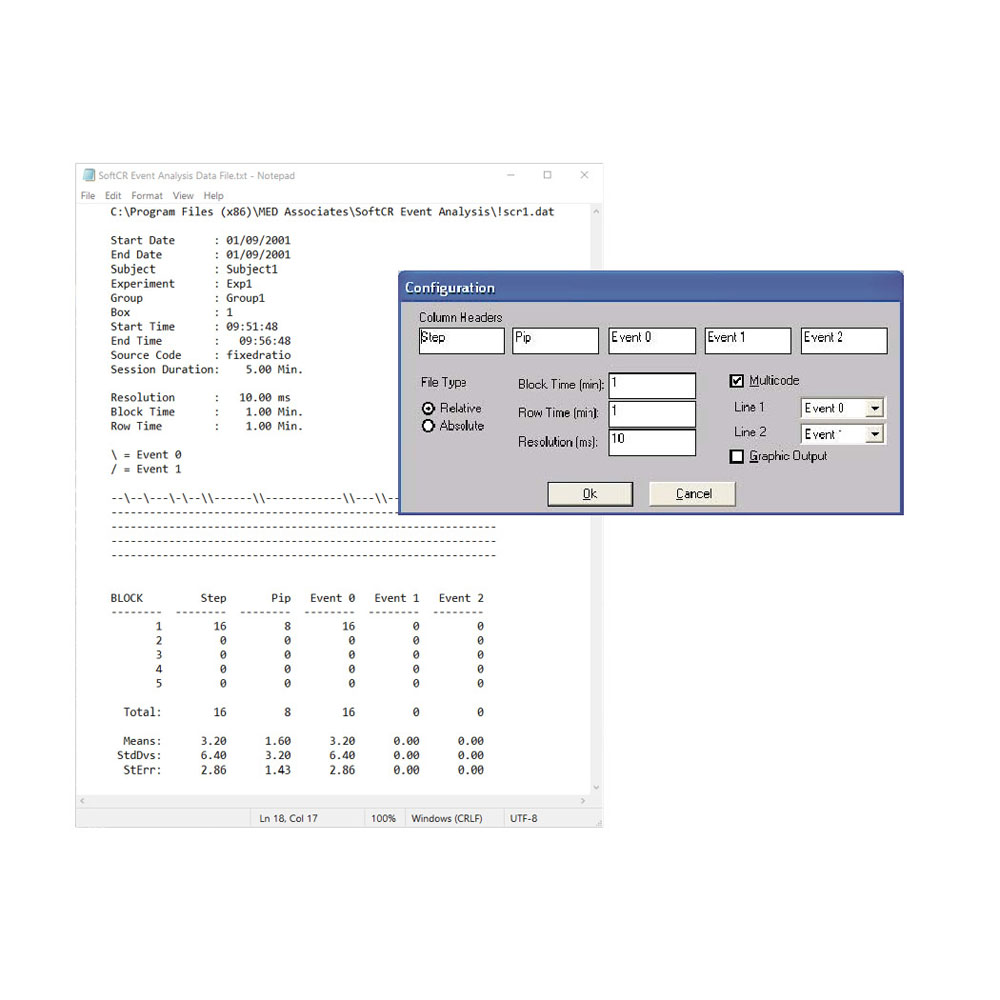
Designed for use with SoftCR data files that were generated using Schedule Manager or with Med-PC format 1 data files.
-
- Creates an output file with the same filename and “.OUT” extension and displayed in notepad
- The file can be printed from the SoftCR Event Analysis program or from Notepad
Configure the analysis file with the following:
- Column Headers: Titles for the five columns
- File Type: Select “Relative” or “Absolute”, depending on which method was used to generate the data file
- Block Time (min): Length of time to segment data for calculating the mean, standard deviation, and standard error of the mean
- Row Time (min): Length of time represented by each row of the data display
- Resolution (ms): Resolution that was used to generate the data file
- Multicode: Display two events simultaneously
- Line 1*: SoftCR event, causes a back slash to be drawn in the data display
- Line 2*: SoftCR event, causes a forward slash to be drawn in the data display
- Vertical Line*: SoftCR event, causes a vertical line to be drawn in the data display
- Graphic Output: Writes directly to the printer, which creates a much higher detail graph.
* NOTE: enabled only if mulitcode is deselected
SKU: SOF-720E
| Specifications | |
|---|---|
| Species | Mouse, Rat, Pigeon |


Request a Consultation
Our experts are standing by to help you put together the perfect package for your needs. Just fill out our request form and a team member will get back to you within 1 business day.
 Powered by Bioz